Simulate Dynamic Inventory in Development
Categories:
Projects:
c2platform/phx/ansible
Problem
For organizations new to automation, dynamic inventory may offer limited immediate value, as manual steps often need automation first. Unfamiliarity with Ansible and inventory mechanics, like precedence rules, can lead to suboptimal solutions1.
Context
In Dutch government organizations starting with automation, familiarity with Ansible is often limited, let alone with concepts like dynamic inventory. This is the primary context.
Dynamic inventory represents a future milestone. In a mature professional environment, a request in tools like vRA for a server or full environment (multiple servers) could suffice. An Ansible operator would only need the vRA portal to provision. The vRA setup applies labels that a dynamic inventory plugin uses for complete provisioning, without altering the inventory project.
Solution
Start in the
development environment with the
Vagrant inventory plugin
for
Vagrant. This plugin is not dynamic inventory in the traditional
sense—it does not query an external cloud API or database. Instead, it reads the
Vagrantfile.yml YAML file from the C2 Platform and generates an inventory that
Ansible can use. In doing so, it simulates how dynamic inventory works: it
demonstrates how inventory can be generated from a data source rather than being
manually maintained.
Use this working example to explain and illustrate the benefits of dynamic inventory to organizations new to Ansible. It shows how fully automated provisioning works without manual steps, demonstrates future scalability, and simplifies inventory management as automation matures.
Benefits
- Provides a practical example to guide organizations toward advanced automation.
- Reduces manual inventory updates as infrastructure scales.
- Builds Ansible understanding through real-world application.
- Prepares teams for production-like automation.
Examples and Implementation
VMware vRealize Automation (vRA)
This diagram illustrates the collaborative roles of the infra team and DevOps team in a vRA-based environment:
- The infra team sets up vRA for VM requests via the vRA Portal and assigns
labels to images (e.g.,
ubuntu,ubuntu24,rhel,rhel9,win,win2022). - The DevOps team selects predefined environment labels (e.g.,
development,test,acceptance,production) and application role labels (e.g.,hello-world) through the portal. - The DevOps team uses a dynamic inventory plugin to fetch labeled nodes from the vRA API, generating host information and Ansible groups.
- Additional static groups (e.g.,
linux) are defined in ahosts.inifile for broader targeting, remaining static after initial setup. This file is part of the Ansible inventory project.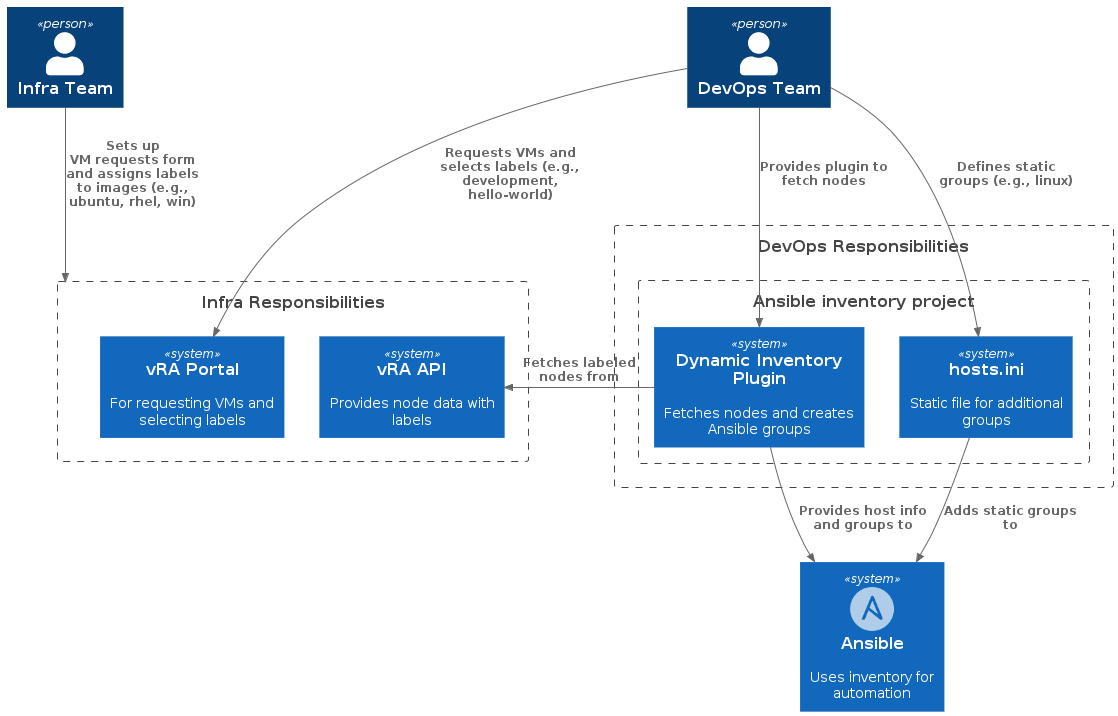
Table illustrating a labeling scheme for images and VMs, showing how vRA labels map to Ansible groups and the responsibilities of Infra and DevOps teams.
| Type | Infra Team | DevOps Team | Label(s) | Ansible Group(s) | Description |
|---|---|---|---|---|---|
| VM Image | Responsible | ubuntu ubuntu24 | ubuntu ubuntu24 | Labels for Ubuntu 24-based images; forms an Ansible group for all Ubuntu hosts | |
| VM Image | Responsible | rhel rhel9 | rhel rhel9 | Labels for Red Hat Enterprise Linux 9 images; groups RHEL hosts. | |
| VM Image | Responsible | win win2022 | win win2022 | Label for Windows 2022 images; groups all Windows hosts. | |
| DTAP | Provides options | Selects | development test acceptance production | development test acceptance production | Environment labels; assigns hosts to a specific environment. |
| Service/Application | Provides options | Selects | hello-world | hello-world | Application role label; creates a group for hosts running “hello-world” app. |
| Ansible Inventory | Responsible | linux | linux | Static group defined in hosts.ini for broader targeting of Linux hosts. |
Example in Development
The inventory plugin for Vagrant illustrates how the vRA example would work. It operates on the same fundamental principles, providing a concrete example of how labels in the virtualization technology—vRA in production-like domains or Vagrant in development—are used with a plugin to dynamically generate host information and define Ansible groups.
Inventory Plugin for Vagrant
The PHX
reference implementation
c2platform/phx/ansible contains an example of a custom inventory plugin.
The plugin plugins/inventory/vagrant.py reads Vagrantfile.yml to generate
the inventory.
It adds hosts, sets variables such as IP addresses, and assigns groups based
on prefixes, labels, and additional INI files.
It can also export the generated inventory to an INI file for debugging or
integration.
# pylint: disable=super-with-arguments
#!/usr/bin/env python3
import os
import yaml
from ansible.errors import AnsibleError
from ansible.plugins.inventory import BaseInventoryPlugin
import configparser
import re


class InventoryModule(BaseInventoryPlugin):
    NAME = "vagrant"

    def verify_file(self, path):
        return path.endswith((".yml", ".yaml")) and "Vagrantfile" in os.path.basename(
            path
        )

    def parse(self, inventory, loader, path, cache=True):
        super(InventoryModule, self).parse(inventory, loader, path, cache)
        try:
            with open(path, "r", encoding="utf-8") as file_handle:
                data = yaml.safe_load(file_handle)
        except Exception as exception_error:
            raise AnsibleError(
                f"Error loading Vagrantfile: {str(exception_error)}"
            ) from exception_error
        boxes = data.get("boxes")
        defaults = data.get("defaults", {})
        default_prefix = defaults.get("prefix")
        for node in data.get("nodes", []):
            nodename = node.get("name")
            host_prefix = node.get("prefix", default_prefix)
            host = f"{host_prefix}-{nodename}"
            if not host:
                continue
            self.inventory.add_host(host)
            ip_address = node.get("ip-address")
            if ip_address:
                self.inventory.set_variable(host, "ansible_host", ip_address)
            # Determine environment group based on last letter of prefix
            if host_prefix:
                last_char = host_prefix[-1].lower()
                env_group = None
                if last_char == "d":
                    env_group = "development"
                elif last_char == "t":
                    env_group = "test"
                elif last_char == "a":
                    env_group = "acceptance"
                elif last_char == "p":
                    env_group = "production"
                if env_group:
                    self.inventory.add_group(env_group)
                    self.inventory.add_child(env_group, host)
            # Labels
            node_labels = node.get("labels", [])
            box_labels = boxes.get(node.get("box", ""), {}).get("labels", [])
            for label in node_labels + box_labels:
                self.inventory.add_group(label)
                if label != host:
                    self.inventory.add_child(label, host)

        # Handle additional inventory files
        inventory_files = defaults.get("inventory", [])
        for inv_file in inventory_files:
            inv_path = os.path.join(os.path.dirname(path), inv_file)
            if os.path.exists(inv_path):
                self._parse_ini(inv_path)

        # Export to INI if configured
        inventory_export = defaults.get("inventory_export")
        if inventory_export:
            export_path = os.path.join(os.path.dirname(path), inventory_export)
            self._write_ini(export_path)

    def _parse_ini(self, ini_path):
        print(f"ini_path: {ini_path}")
        config = configparser.ConfigParser(allow_no_value=True)
        with open(ini_path, "r", encoding="utf-8") as f:
            config.read_file(f)

        for section in config.sections():
            if ":" in section:
                group_name, section_type = section.split(":", 1)
                group_name = group_name.strip()
                section_type = section_type.strip()
                if section_type == "children":
                    if group_name not in self.inventory.groups:
                        self.inventory.add_group(group_name)
                    for child in config.options(section):
                        child = child.strip()
                        if child:
                            self.inventory.add_group(child)
                            self.inventory.add_child(group_name, child)
                elif section_type == "vars":
                    if group_name not in self.inventory.groups:
                        self.inventory.add_group(group_name)
                    for var, value in config.items(section):
                        value = value.strip() if value else None
                        self.inventory.set_variable(group_name, var, value)
            else:
                # Regular group
                self.inventory.add_group(section)
                for host in config.options(section):
                    host = host.strip()
                    if host:
                        # Check if it's a host with vars, but in simple ini, options are hosts
                        # If there's value, it might be port or something, but for now assume host
                        self.inventory.add_host(host, group=section)
                        # If there are vars like host=var, but in standard ini, hosts are keys with no value

        # Handle host vars if any, but in standard ini, host vars are in [host:vars] which we handle above

    def _write_ini(self, ini_path):
        config = configparser.ConfigParser(allow_no_value=True)

        # Add groups and hosts
        for group_name, group in self.inventory.groups.items():
            if group_name == 'all' or group_name == 'ungrouped':
                continue
            config.add_section(group_name)
            for host in group.hosts:
                config.set(group_name, host.name, None)

        # Add children
        for group_name, group in self.inventory.groups.items():
            if group.child_groups:
                section = f"{group_name}:children"
                config.add_section(section)
                for child in group.child_groups:
                    config.set(section, child.name, None)

        # Add group vars
        for group_name, group in self.inventory.groups.items():
            vars_dict = group.get_vars()
            if vars_dict:
                section = f"{group_name}:vars"
                config.add_section(section)
                for k, v in vars_dict.items():
                    config.set(section, k, str(v))

        # Add host vars
        for host_name, host in self.inventory.hosts.items():
            vars_dict = host.get_vars()
            # Remove ansible_host as it's usually set separately
            vars_dict = {k: v for k, v in vars_dict.items() if k != 'ansible_host'}
            if vars_dict:
                section = f"{host_name}:vars"
                config.add_section(section)
                for k, v in vars_dict.items():
                    config.set(section, k, str(v))

        # Add [host] sections for hosts with ansible_host
        for host_name, host in self.inventory.hosts.items():
            ansible_host = host.get_vars().get('ansible_host')
            if ansible_host:
                section = host_name
                if not config.has_section(section):
                    config.add_section(section)
                config.set(section, f'ansible_host={ansible_host}')

        with open(ini_path, 'w', encoding='utf-8') as f:
            config.write(f)
The Vagrant inventory plugin is an Ansible inventory plugin used for the development environment.
The purpose of this plugin is twofold. First, it provides a single source of truth for both Vagrant and Ansible during development. This eliminates the need to duplicate information—such as IP addresses—across Vagrant and Ansible configurations.
Second, it illustrates how inventory can be built for Ansible using a custom module or plugin. Its application in the development environment simulates dynamic inventory. Many government organizations struggle with the concept of dynamic inventory. This plugin serves as a practical example of a custom inventory plugin.
Vagrantfile.yml
The Vagrantfile.yml defines the pxd-s3 node using the ubuntu22-lxd box,
assigns IP 192.168.60.14, and specifies the
playbook mgmt/s3 for
provisioning. Vagrant uses this to create and configure the node.
22  ubuntu22-lxd:
23    name: c2platform/ubuntu-jammy
24    version: 0.1.1
25    provider: lxd
26    labels: [ubuntu, lxd, ubuntu22]
272  - name: s3
273    short_description: S3
274    description: MinIO S3
275    box: ubuntu22-lxd
276    ip-address: 192.168.60.14
277    plays:
278      - mgmt/s3
279    labels:
280      - s3
281      - s3_download_server
The inventory plugin assigns this node to the Ansible groups s3
and s3_download_server based on its labels. In this test setup, pxd-s3
belongs to both groups, serving as both the S3 server and the test client. In
production-like scenarios, these roles would be separated.
hosts.ini
This static inventory file provides base groups and variables.
# Note: hosts and groups come from Vagrantfile.yml primarily

[linux:children]
ubuntu
rhel

[win_ssh_server:children]
win

[linux:vars]
ansible_user=vagrant
ansible_password=vagrant

[win:vars]
#ansible_connection=ssh
#ansible_shell_type=cmd
ansible_user=vagrant
ansible_password=vagrant
ansible_connection=winrm
#ansible_port=5985
ansible_winrm_transport=basic
ansible_winrm_server_cert_validation=ignore
Group Membership Example
This section demonstrates how Ansible groups are dynamically assigned to a node using the inventory plugin and static definitions.
Let’s take the node pxd-s3 as an example. Using the debug module, we can
query the group_names for pxd-s3. See below.
ansible -m debug -a 'msg={{group_names}}' pxd-s3
θ61° [:ansible-phx]└2 master(+2/-1) ± ansible -m debug -a 'msg={{group_names}}' pxd-s3
ini_path: /home/onknows/git/gitlab/c2/ansible-phx/hosts.ini
pxd-s3 | SUCCESS => {
    "msg": [
        "development",
        "linux",
        "lxd",
        "s3",
        "s3_download_server",
        "ubuntu",
        "ubuntu22"
    ]
}
The Ansible groups are derived as follows:
lxd,ubuntu, andubuntu22originate from the definition of the Vagrant boxubuntu22-lxdinVagrantfile.yml.s3ands3_download_serverfrom the definition of the nodepxd-s3inVagrantfile.yml.linuxfromhosts.ini.
Additional Information
- For more on GitLab Runner as a control node: Using GitLab Runner as Ansible Control Node
- For more information about the
pxd-s3node: Create and Test an S3 Service - Ansible Inventory Project: A structured collection of files used for managing hosts and configurations. It typically includes inventory files, playbooks, host configurations, group variables, and Ansible vault files.
In the context of the PHX project, a suboptimal solution was explored where the idea arose to automate the addition of servers to the static
hosts.inifile in the correct Ansible groups to simplify the work of the Ansible operator. At the time, the project used a traditional static inventory file rather than dynamic inventory, even though it also used vRA for provisioning. This approach is suboptimal for two reasons. First, managing the inventory file with Ansible groups and nodes is not overly complex, and the Ansible operator requires a thorough understanding of it regardless, as it forms the foundation of effective automation. Second, it would be more logical to create Ansible groups based on tags or labels in vRA and derive the inventory information from there—a challenge that is naturally resolved when adopting dynamic inventory, rather than automating updates to a static file. ↩︎
Feedback
Was this page helpful?
Glad to hear it! Please tell us how we can improve.
Sorry to hear that. Please tell us how we can improve.